
The utility preserves data integrity completely. The formatting applied on the files,their content,their layout is as it is maintained after the conversion. No change in the quality of files is done by the utility during the whole migration process.


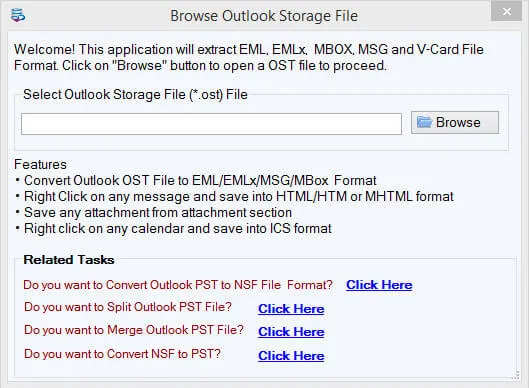
See Softaken OST File Exporter load an offline OST file,preview the mailbox folder tree and email body,choose EML export with naming options,and save messages with attachments — without installing Microsoft Outlook. Import the generated EML files into Thunderbird,Windows Mail,Outlook Express,eM Client,or Apple Mail.

Browse a single OST or use Folder mode for bulk OST to EML conversion.

Review Inbox,Sent,Drafts,then preview email body,headers,and attachments.

Choose EML export,set naming filters (Subject,Date,From),and pick the save folder.
Click any screenshot to enlarge. Demo exports 10 items per folder. Full license is $49. Gallery:OST File Exporter screenshots.
The utility preserves data integrity completely. The formatting applied on the files,their content,their layout is as it is maintained after the conversion. No change in the quality of files is done by the utility during the whole migration process.
No data loss during conversion process. OST to EML converter saves your important OST files from damage. The conversion quality is 100% achieved by smoothly transforming all types of OST files to EML format without losing formatting of files and content.
With OST to EML Converter,you can export any size OST file to EML without any interruption having no data loss and damage to any file. All the files are safely migrated from OST to EML without facing any issue by the users.
Providing preview of the converted files. OST to EML conversion program supports preview of the migrated files before you save. The preview option ensures quality of the migrated data.
Allow conversion of desired OST files. OST to EML transfers those OST files that you want to convert. It gives "Search" menu to locate those specific files that you want to convert to EML format.
Conversion speed is fast and without much manual attempts. It saves quality time of users by allowing fast speed migration. A few simple clicks are required to click to convert OST Outlook to EML. No more extra efforts required for the conversion.
The tool allows saving of the converted OST items to desired location of your system. The users can set this location as per their suitability. Moreover,a new folder can be created easily to save the EML files or a user can use existing folder for this.
Free trial is offered. Before you head to purchase the OST 2 EML license,you can try the free trial version. The free demo helps you understand the functionality of the software. It helps you take the decision of purchasing the software. So,get ready to try the OST to EML free trial.
With this application,no matter which Outlook version OST file you have,you can easily convert OST file to EML. The software supports all Outlook including Outlook 2003,2010,2013,2016,and 2019.
Free Demo version scans,previews 100% of mailbox items,and exports up to 10 items per folder from OST to EML format.
The free demo scans,previews 100% of mailbox items,and exports up to 10 items per folderfrom OST to EML format. The full license is unlimited. Personal license is $49.
System Requirement
ProcessorAny Pentium Class
Operating SystemWindows 11,10,8.1,8,7 &Other
Memory512 MB Minimum
Hard Disk100 MB of free space for software installation
Software Delivery
ElectronicVia Email
Minutes15
Demo10 items / folder
Full License$49
Interface Available
Language SupportedEnglish
Support OptionEmails,Chat &Skype
PlatformWindows only (conversion tool)
ProductOST to EML Converter
Download Guides
Recent Blogs